Images can both enhance user experience and express a brand’s visual language. Images can help tell a story, clarify complex messages that are difficult to express with words, and to show users how to perform an action. They can help users if they are clear and simple. Make sure everyone can access the information that images convey.
Guidelines
- All images must be optimised before uploading (maximum file size for all images is 1024kb - however, most images shouldn't be more than 200-300kb in size).
- Images should be resized before uploading (see below).
- For photographic images jpg format is to be used.
- For logos, png format is preference (png should NOT be used for photographic images).
- Alt text is required to be added to all images.
- All images must be tagged as follows:
- Categories: describes where the image is used on the site. This will usually be section of the site, but can refer to the page if particularly image intensive. Examples: Study, Open Day, Courses, Study areas, etc.
- Tags: describes how the image is used on the page, usually determined by which widget it is added to.
Image Sizes - quick reference
| Library | Width | Height | Max file size |
|---|---|---|---|
| Banner | 1920px | 700px | 1024kb |
| Default Library | 960px | 580px | 1024kb |
Banners
- To be used only where an image is required to span the full width of the screen (e.g. Full Width CTA Banner).
- Images exceeding 1920px should be resized before uploading.
Default Library
- All other images can be uploaded into the Default Library
- Images exceeding 960px wide should be resized before uploading.
Notes
For the most part, content editors will only need to upload images at the above two sizes with the following exceptions:
- Images that are added to a page within a Content Block or using the Image widget may use a different size or ratio but can still only have a maximum width of 960px (see: Image widget).
- Where an image is displayed within a circle it will automatically be cropped to fit the 1:1 ratio (unless already uploaded in 1:1 ratio). For a 960 x 580px image, for example, this will mean that 190px will be cropped from both the left and the
right side. Therefore the focal point of the image should be in the centre.
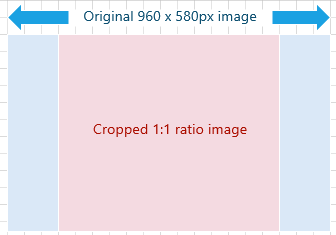
- Examples: content block, content card, cta banner, etc.